Tuesday, 18 April 2017

Ready to make your first dollar?

See how on this step-by-step workshop Sumo VIEW IN BROWSER

Ready to make your first dollar?

See how on this step-by-step workshop

Maybe you’ve blogged for months, wondering how in the world people ever make money doing this stuff. Or maybe you just started a business and you’re struggling to make that first $1.

In this Thursday’s (12pm Central) workshop, Troy’s going to help you break through by sharing an easy, repeatable formula for making your first sale.

This isn’t a workshop that gives unrelatable tips only the ultra-successful can use. These are real, actionable steps Troy used to go from $0 to four figures a month in a short time. 

Note: Space is capped to 600 people.

Secure your spot!

Friday, 14 April 2017

New Updates: Upload your content upgrades (and new Smart Bar)

Here's what's new in Sumo Sumo VIEW IN BROWSER

New Updates: Upload your content upgrades (and new Smart Bar)

Here's what's new in Sumo

Hey Sumos! Sean here, and this batch of updates brings an extremely exciting new feature that y’all have asked for since Day 1.

Let’s dig in.

Big Update #1: Upload your Content Upgrades 

EXPLOSION EMOJI! HYPE HORNS! MORE EXPLOSION EMOJIS!

That’s right. You can now upload your content upgrades directly into List Builder. No more uploading your content to some weird site, grabbing a link and pasting it into List Builder.

PDFs, images, MP4s, spreadsheets...if it’s a file, you can upload it and give it away instantly (it downloads right in your subscriber’s browser).

There are three distinct ways to use this new feature:

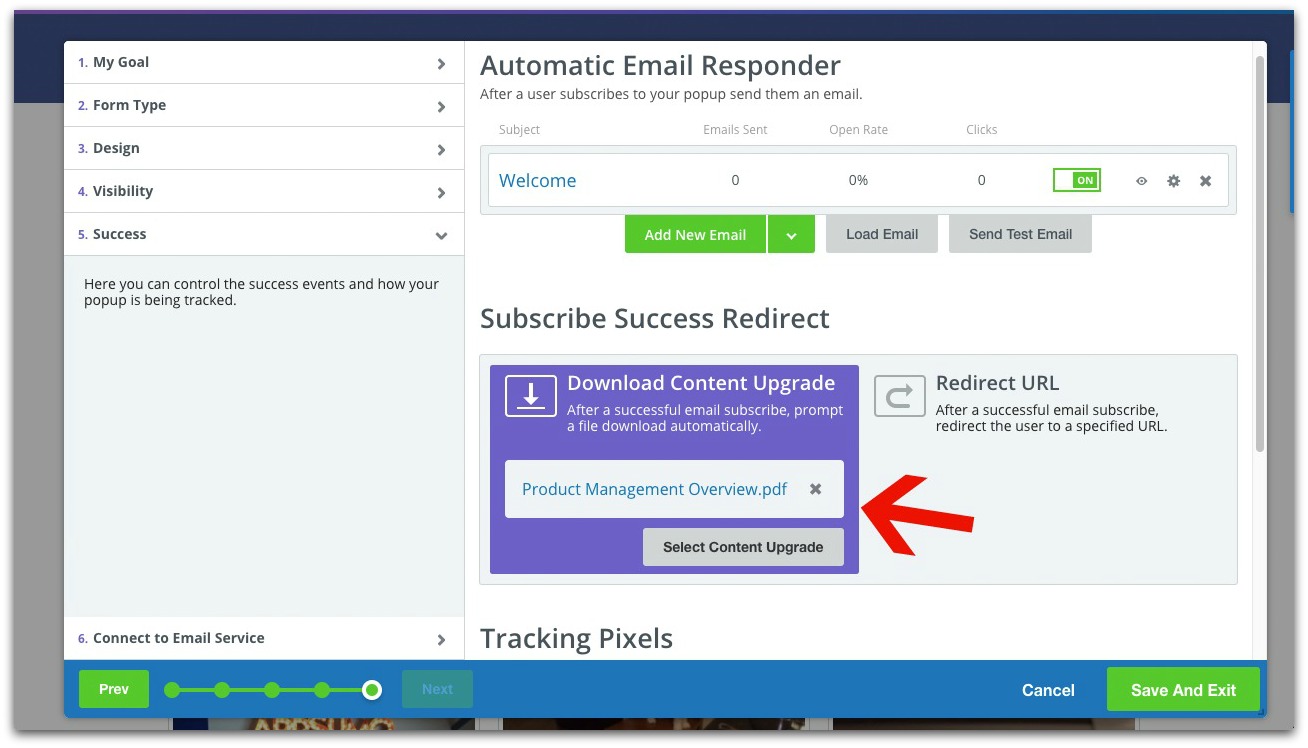
When you’re creating your List Builder popup, you can upload your content upgrade in the success tab:

Uploading your content upgrade like this means the content will instantly download once your subscriber opts-in.

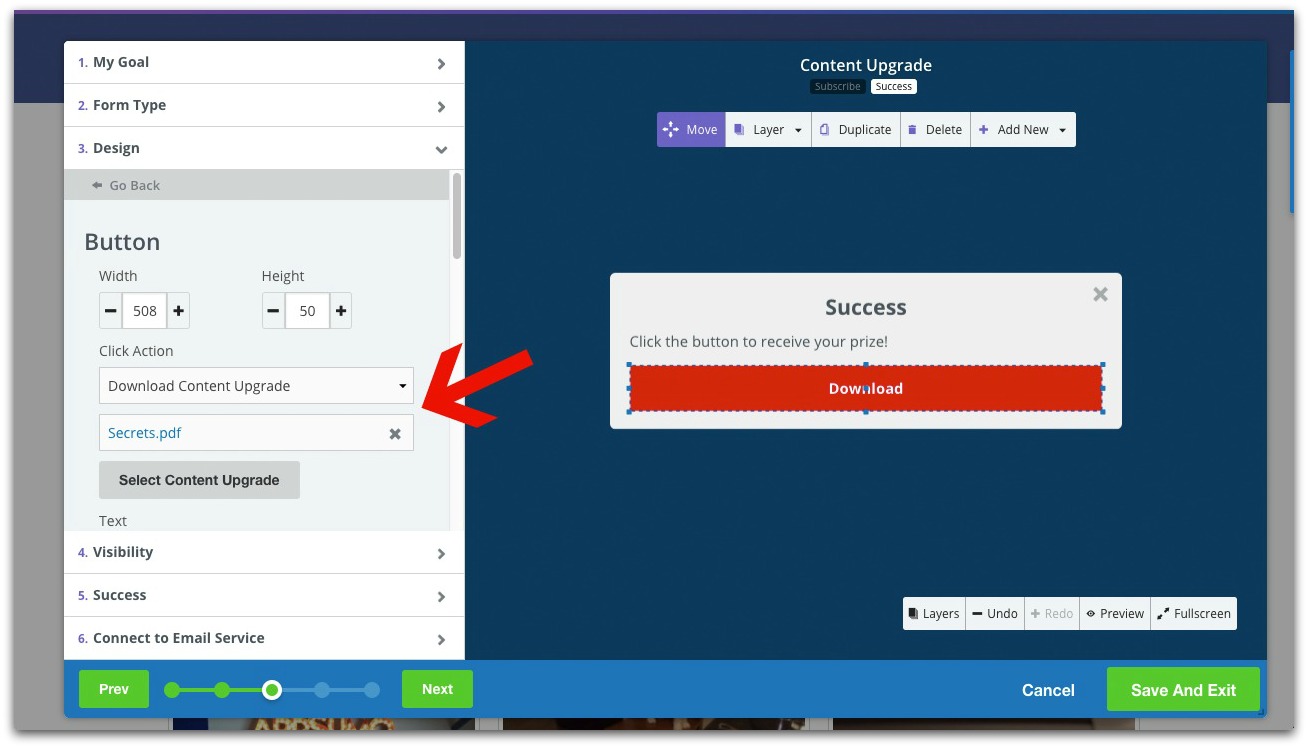
You can also upload your content upgrade if you click on your opt-in button:

With this option, the content upgrade will automatically download when your subscriber clicks the button on your success popup.

PRO TIP: Use text like “Download” on your button to make it clear what your subscriber needs to do.

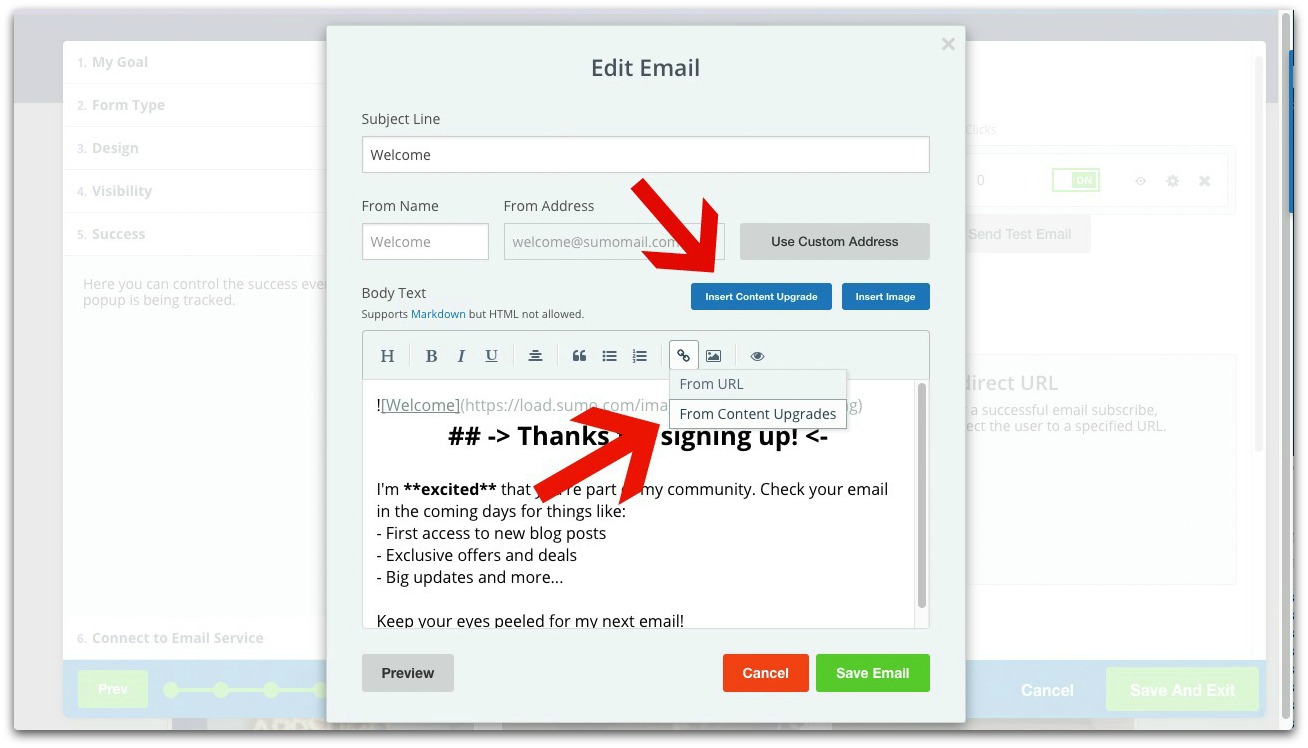
If you’re using Auto Responder (which you really should), you have the option to upload your file directly to the email by either inserting your content via a link OR clicking the “Insert Content Upgrade” button:

When your subscribers click the link, the content upgrade will automatically download in their browser.

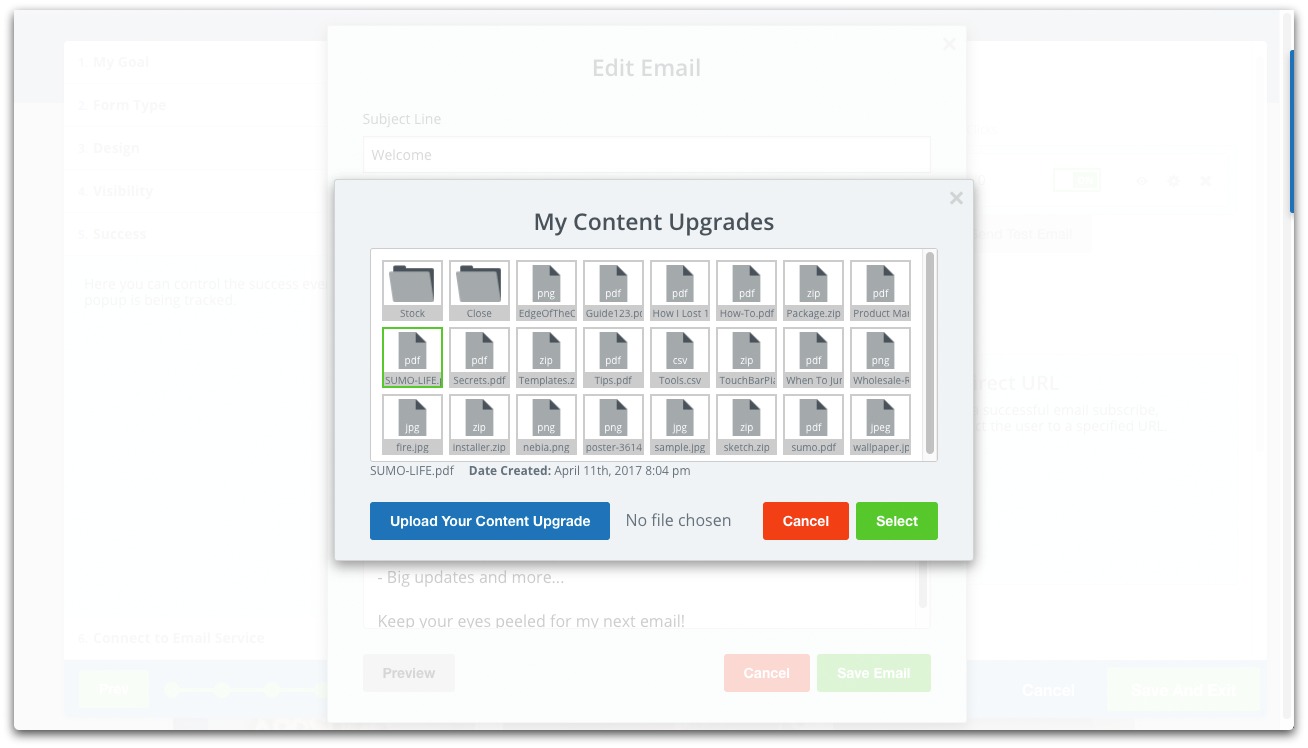
Once you upload a file, it’s available in your library if you want to use it in multiple popups:

This is a HUGE feature y’all have wanted for a long time, and you’ll love the increase in conversions when your subscribers happily get their content PRONTO.

Click here to use List Builder and try the new feature

Big Update #2: Smart Bar Is Part of List Builder

List Builder just got a whole lot smarter (the pun was unavoidable).

Last email, we rolled Scroll Box into List Builder. In this email, we’re yelling from the rooftops that Smart Bar is now part of List Builder, too.

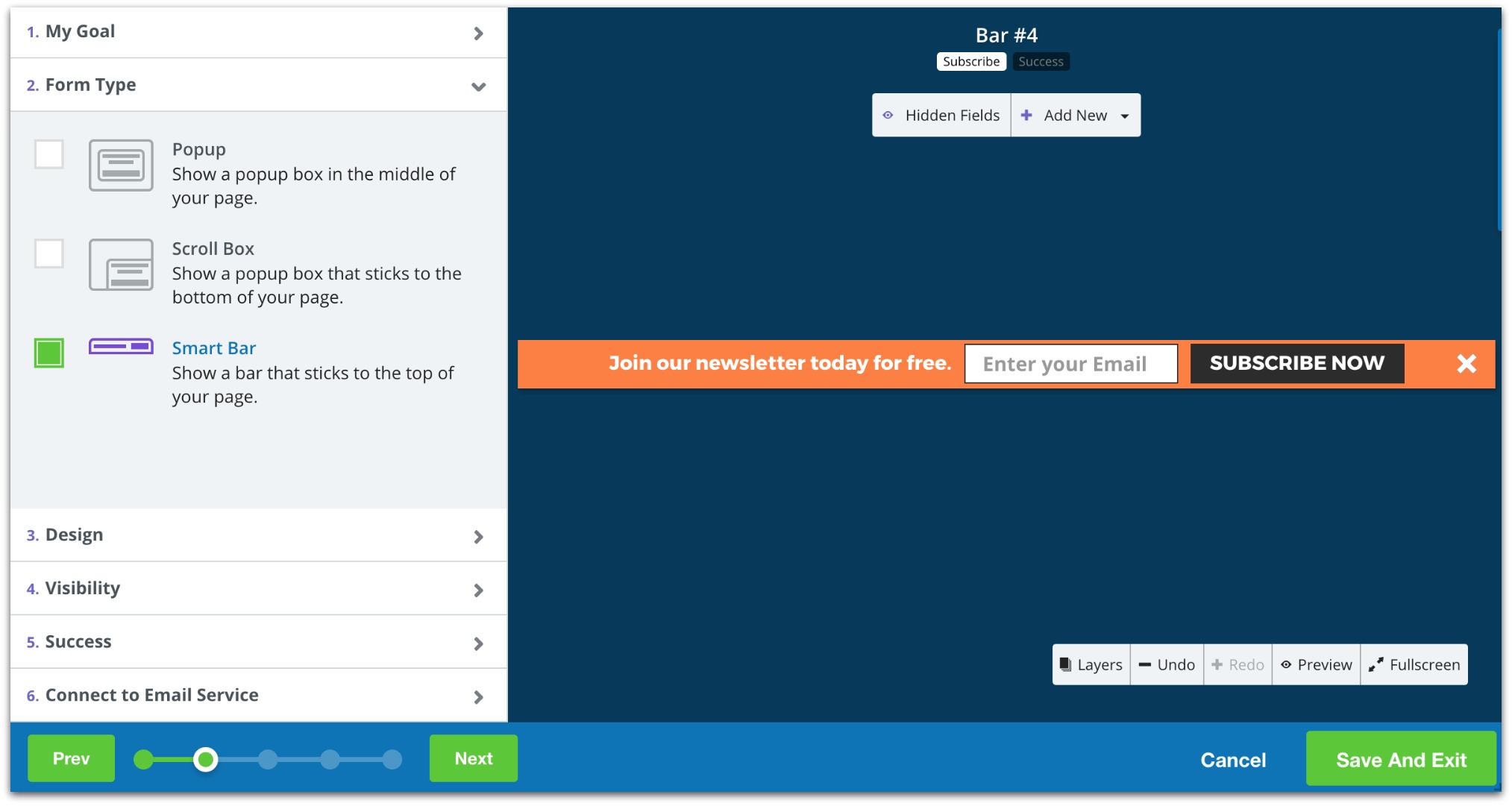
When you go into List Builder, you have the option of creating a Smart Bar in the “Form Type” tab:

From there, you have the power of List Builder’s drag-and-drop functionality to create your perfect Smart Bar.

On the List Builder homepage, Smart Bars will look like this:

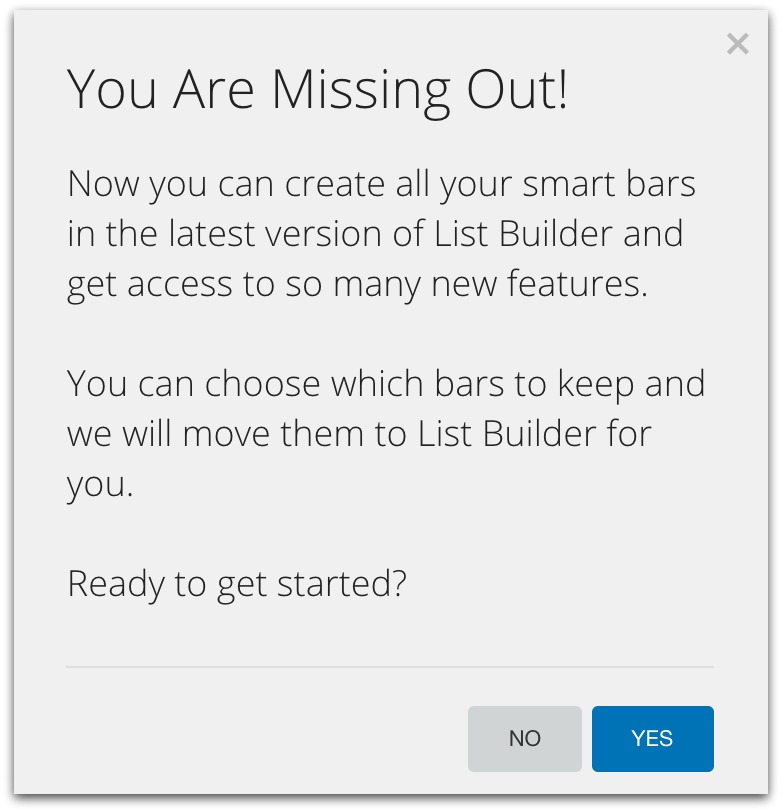
It’s highly recommended you import your existing Smart Bars over to List Builder (so you can manage them all in one place). To do that, just open your Smart Bar app and click “Yes” on the popup:

Click here to use Smart Bar in List Builder

I’d say “that’s it” for this round of updates, but they’re so big I don’t think “that’s it” really does them justice :)

Stay tuned for the next email. We’re releasing an entirely new app that’ll change the way you communicate with subscribers.

Enjoy the new updates,

Sean “Coach” Bestor

P.S. Want to have a hand in creating the next feature in Sumo? Give us some feedback in this survey. I read every response.

Try out Smart Bar in List Builder

Thursday, 13 April 2017

We still on for 12?

I'll show you how to set up Sumo Sumo VIEW IN BROWSER

We still on for 12?

I'll show you how to set up Sumo

Hey, Troy here. Wanted to make sure you secured your spot at 12pm CST today to let me help you set up Sumo and build a massive email list.

After growing my new business’s revenue 376% in six months, I’ve picked up some specific growth techniques you won’t find in any article, book or class.

I’m going to show you EXACTLY how to drive thousands of visitors to your site, double your email list and turn all that traffic into money in the bank.

I’m almost at capacity, so ....

Click here to secure your spot for today’s workshop.

See you soon,

Troy Stites

P.S. I’ve got a special Sumo offer in store for you. Secure your spot to find out what it is...

Secure your spot

Wednesday, 12 April 2017

How to write sales emails that are impossible to ignore

Consider this the last thing you'll need to read on sales emails Sumo VIEW IN BROWSER

How to write sales emails that are impossible to ignore

Consider this the last thing you'll need to read on sales emails

Be honest. How often has this happened to you?

Ouch. YOU thought it was a great email, but the person on the other end thought otherwise.

You know you can provide value. But your emails aren’t telling that story

And that is immensely frustrating. All you want to do is land big clients to bring in money to fuel your business (not to mention build prestige to bring in more customers).

So instead of sending and praying, I’m going to show you the exact steps behind how our sales team writes the best cold emails in the industry.

Click here to read The Cold Email Bible

Our sales team is letting me share with you the same four “truths” they use to land clients like Airbnb, Entrepreneur, The Chive, Tony Robbins, Beachbody, 4-Hour Workweek and more. 

Read this guide before they change their minds and make me take it down.

Coffee is for closers, and this guide is for everyone,

Sean “Coach” Bestor

P.S. We’re even giving away a bunch of cold email templates. Click here to read the guide and get them.

Read the guide